 tl;dwatch
Too Long; Didn't Watch
Summarize and Analyze YouTube with AI.
Get key takeaways & timestamped summaries with no friction and organize them right in your browser.
Features
No Friction
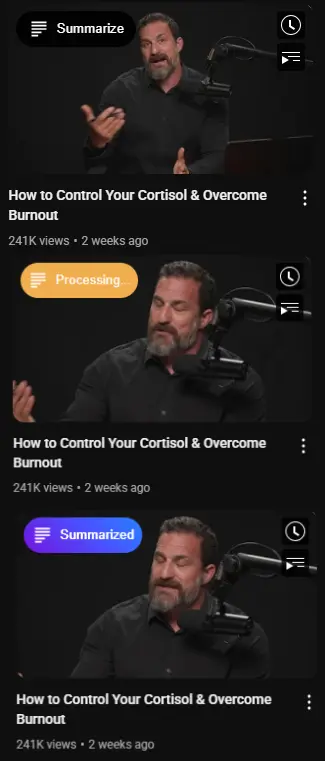
No need to even click on the video, summarize right from the thumbnail.
AI Summaries
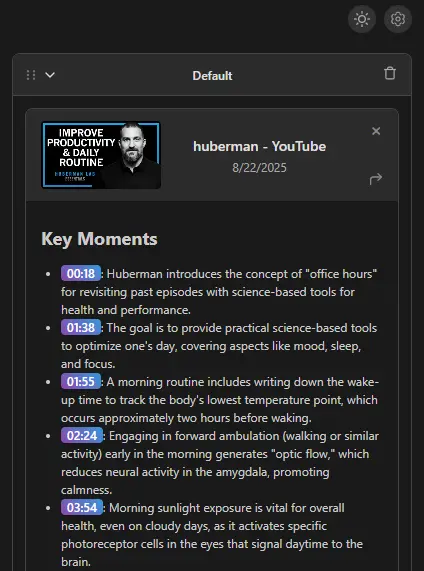
Chronological summaries with clickable timestamps, jump right to the interesting part.
AI Analysis
Objective analyses to give you only the key takeaways without watching the whole thing.
Custom Prompts
Write your own prompt at no extra cost.
Folders & Synchronization
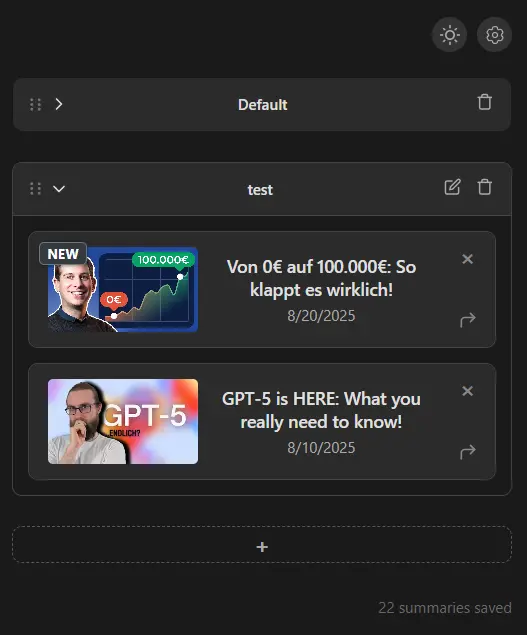
Organize your summaries in folders and synchronize them between your devices.
Markdown Enabled
AI results are returned in Markdown format, ready to be copied in one click.
Gallery
Pricing
Free
$0 /mo
- • AI summaries (standard)
- • Timestamp labels (non-clickable)
- • Folders & unread counter
Premium
Most Popular $6.99 /mo $69 /year
- • Unlimited summaries
- • Clickable timestamps
- • Custom prompts
- • Sync & priority support
Frequently Asked Questions
Can I use it for free? ▼
Yes, there is a free version with 90 credits per month.
What if I spent all my credits and need more? ▼
You can buy extra credits (or upgrade to premium if you haven't already).
Do I need a Google account to use the extension? ▼
Yes you have to use the extension with the same Google account that you use for YouTube.
How do credits work? ▼
1 credit = 1 minute of processed video, regardless of the prompt type.
Do credits expire? ▼
Yes. Monthly credits rollover into the next month and then expire the following month (October credits expire in December). Credits that you buy extra expire after one year.
Are there any limits for custom prompts? ▼
Yes, currently there is a 1000 character limit for your custom prompt. This limit might be increased in the future.
What languages are available? ▼
The built-in Summary and Analysis modes use English. Your custom prompt can be written in any language and the AI will usually answer in it.
What AI is used? ▼
Google's Gemini AI.
Can I cancel my subscription any time? ▼
Yes, you can cancel your subscription at any time through the billing portal. Just go to Settings, click on your profile and click "Manage subscription". There you will see a "Cancel subscription" button.
Can I install the extension on other Browsers? ▼
No, currently the extension is only available on Google Chrome. I hope to bring this extension to other browsers in the future.
How can I reach out to you? ▼
You can always reach out to me by sending an email to <placeholder>.